Customizing Your Blog Design
Written By inblog Team
Last updated About 1 year ago
From the left sidebar, click Design to begin customizing the look and feel of your blog.
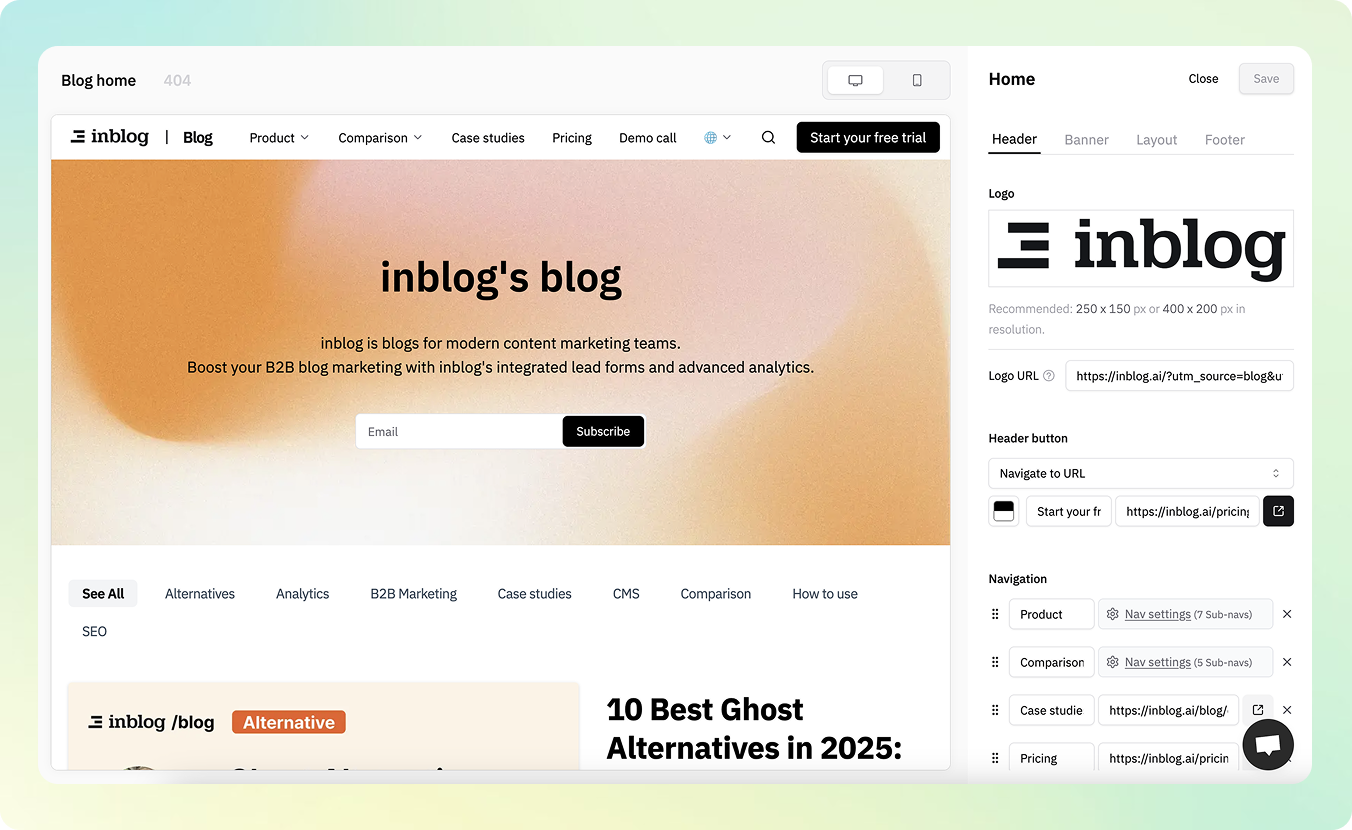
Header
Logo
Upload your logo and set a destination URL for logo clicks.
Recommended size: 250×150 or 400×200
Header Button
Choose from two button types:
Subscribe Form
Display a lead capture form when the button is clicked.
Form content and settings can be configured in the Form tab.
Navigate to URL
Link the button to any internal/external URL.
Navigation Bar
Primary Navigation
Set a static menu bar at the top of your blog.
Dropdown Menu
Configure dropdown items that appear when a menu item is clicked.
Custom Code
You can also inject custom CSS or HTML to fully match your website’s brand guidelines.
Banner
Blog Title & Description
Customize the title and description text shown on your blog’s homepage.
Text Color
Set the color of your banner text.
Banner Layout
Choose text alignment: Left-aligned or Center-aligned.
Background (Color or Image)
Customize the banner background:
Set a solid background color
Or upload a background image
Recommended sizes: 1680×450 for desktop / 390×300 for mobile
Custom Code
You can also inject custom CSS or HTML to fully match your website’s brand guidelines.
Layout
inblog offers three default post layouts to choose from.
You may also apply additional visual customization via custom code.
Custom Code: Use HTML/CSS for fully tailored layouts.
Footer
Add your company information to the footer section.
Like other areas, the footer can also be customized with code.
404 Error Page
You can configure a custom 404 error page for when a user lands on a non-existent URL.
Mobile Preview Support
Your blog design is fully responsive. Preview how your blog looks on both desktop and mobile views directly from the editor.